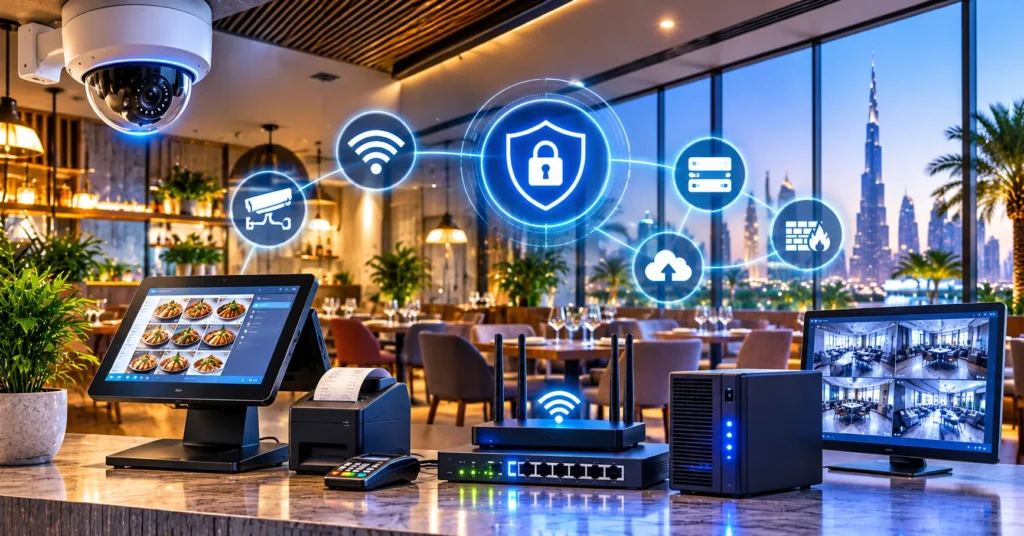
A new Dubai restaurant needs five things working together before opening day: a SIRA-approved CCTV system, a secure business network, guest and staff Wi-Fi, a reliable POS network, and proper signage. Plan them early, use licensed providers, and install in the right order.
The Complete IT and Security Setup for a New Restaurant in Dubai is not one purchase. It is a chain of decisions, and one weak link (a slow POS, a non-compliant camera, a dead Wi-Fi corner) can hurt sales and put your license at risk. This guide explains each part in simple language, in the order you should do it.
Why IT and Security Matter More in Dubai Restaurants
A restaurant is a cash-and-card business with many staff, long hours and busy peaks. That creates three risks:
- Theft and disputes: at the till, in the stockroom, at the door.
- Downtime: if the POS or internet stops on a Friday night, you lose orders in minutes.
- Compliance: Dubai regulators expect security systems to follow set rules, and a fine or a stopped opening is expensive.
Good setup protects money, speeds up service and keeps you legal. It also gives you data (sales, peak hours, best dishes) to run the business better.
Complete IT and Security Setup for a New Restaurant in Dubai: Step by Step
Follow this order. It saves rework, because cabling, ceilings and power are easier to plan before the fit-out is finished.
Step 1: Plan Before the Fit-Out Starts
Talk to your IT and security provider when the interior drawings are being made, not after. Share the floor plan and ask them to mark:
- Camera positions and cable routes
- Network rack or cabinet location (usually the back office)
- POS points: cashier, bar, kitchen display, handheld tablets
- Wi-Fi access point positions
- Signage locations and power points for lighting
Why this matters: pulling cables through a finished ceiling costs far more than doing it during construction.
Step 2: CCTV for Your Restaurant (SIRA Compliant)
In Dubai, security and CCTV systems are regulated by SIRA (Security Industry Regulatory Agency). In simple terms, you cannot just buy cameras from a shop and plug them in. Systems generally need to be designed, installed, and approved through SIRA-licensed channels.
What to cover with cameras:
- Main entrance and exit
- Cashier and payment counter
- Dining area (wide views, not private spaces)
- Kitchen entrance and back-of-house door
- Storage and delivery area
- Parking or street-facing area, where allowed
What to ask your provider:
- Are you SIRA-licensed, and will you handle the approval and documentation for my outlet?
- How many days of recording does my system store? Dubai rules generally expect recordings to be kept for a minimum period (commonly around 30 days), so confirm the current requirement for your premises category with SIRA or your provider.
- What camera quality is used, so faces and activity can be identified at the entrance and till?
- Is the recorder in a locked, safe place with backup power?
- Can I view the cameras on my phone securely?
Do not place cameras in washrooms or prayer areas, and avoid anything that invades privacy. Put a clear CCTV notice at the entrance.
Tip: Cameras are not only for security. Owners use them to check queue time, table turnover and whether staff follow service steps.
Step 3: Build a Strong Business Network (The Foundation)
Every other system (POS, Wi-Fi, cameras, online ordering) sits on your network. If this is weak, everything is weak.
Basics to include:
- Business-grade router and firewall: not a home router. A firewall blocks attacks and lets you control what is allowed.
- Managed switches: these connect your devices and can give power to cameras and access points through one cable (PoE).
- Structured cabling (Cat6): neat, labelled, tested cables. Avoid long chains of cheap extenders.
- Two internet lines: a main fibre line plus a backup (a second provider or 4G/5G failover). If one fails, the restaurant keeps running.
- UPS (battery backup): keeps the router, switch, POS server and recorder alive during short power cuts.
Separate your networks. This is the most important security rule in simple words: do not let guests, staff and payment devices share one network. Create at least three:
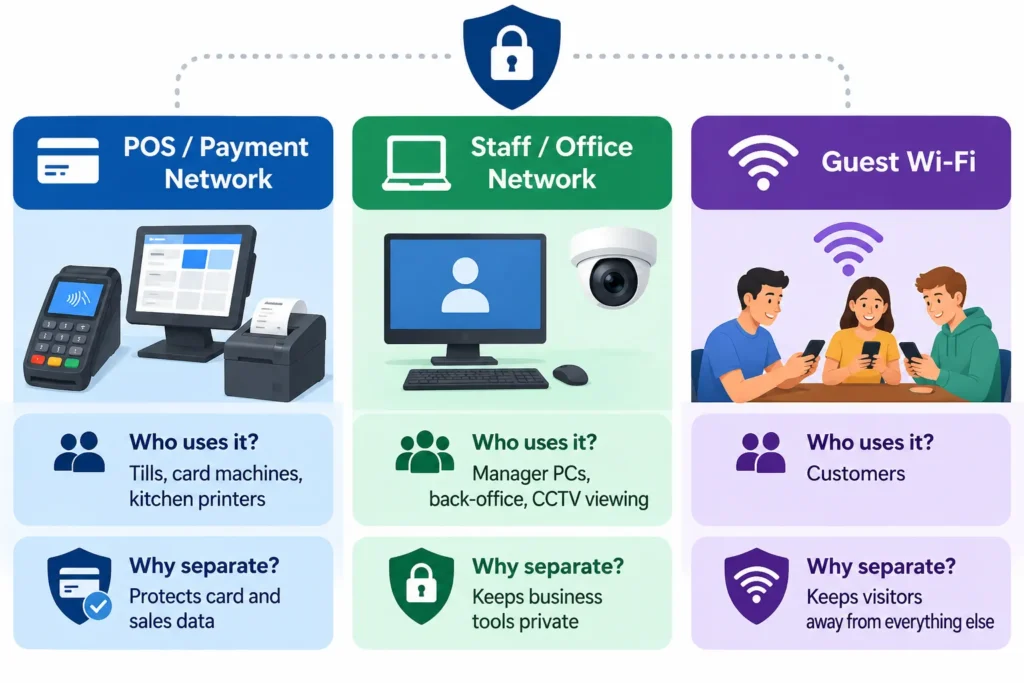
If a guest’s infected phone joins your Wi-Fi, it should never be able to touch your tills.
Step 4: Wi-Fi for Guests and Staff
Good Wi-Fi now matters to diners, and it also runs your tablets, handheld order devices, and delivery apps.
What good restaurant Wi-Fi looks like:
- Enough access points placed by a proper site survey, so there are no dead corners, outdoor seating included.
- Guest login page (captive portal) with your branding, simple terms, and optional sign-up that can grow your marketing list (follow UAE data and privacy rules).
- Speed limits per guest so one person streaming video does not slow the kitchen printers.
- Content filtering to block unsafe or inappropriate websites. This is important in the UAE.
- Logging and monitoring so you can show who used the network if there is ever a problem. Keep to local telecom and data rules.
- Separate staff Wi-Fi with a strong password that you change when people leave.
Common mistake: buying one strong router and putting it in the office. Walls, kitchen equipment and glass reduce signal. Plan access points first, then test after installation.
Step 5: POS Network and Payment Setup
The POS (point of sale) is the heart of your restaurant. It takes orders, sends them to the kitchen, takes payment and records VAT.
Make the POS network reliable:
- Use wired connections for fixed devices (tills, kitchen display, receipt and kitchen printers). Wi-Fi is fine for handhelds, but wired is steadier.
- Give POS devices fixed addresses so printers do not “disappear” at peak time.
- Keep POS on its own protected network (see Step 3).
- Set offline mode so orders can continue if the internet drops, and sync later.
- Make sure the system works with delivery platforms and online ordering, if you use them.
Security and compliance points:
- Card payments should follow PCI DSS rules. Your bank and POS provider can explain what applies to you.
- Give each staff member their own login and the right permission level (a waiter should not be able to void a bill alone).
- Confirm that your POS produces VAT-compliant invoices, and ask your vendor about readiness for the UAE’s e-invoicing rollout, since requirements are being phased in.
- Turn on daily backups and keep reports (sales, voids, discounts) for review.
Smart idea: link POS data with CCTV so you can review the camera footage of any suspicious void, refund or cash-drawer opening.
Step 6: Signage That Works and Stays Legal
Your signage is your first salesperson. It tells people you exist, what you serve and that you are open.
Types to plan:
- Main fascia sign (the shop name, lit at night)
- Projecting or blade sign for people walking along the street
- Menu boards and digital menu screens inside
- Window branding and opening hours
- Directional and safety signs (exits, washrooms, CCTV notice)
Things to check:
- Approvals: outdoor signs usually need permission from your landlord or master developer and the relevant Dubai authority. Start this early because approval can take time.
- Language and licensing: the name must match your trade license, and bilingual (Arabic and English) signage is commonly expected.
- Visibility: pick materials and lighting that look good in strong sun and at night.
- Digital screens: connect them to your network so you can change menus, prices and offers in minutes, without reprinting.
Step 7: Test Everything Before Opening Day
One week before opening, run this checklist:
- Pull the main internet line and confirm the backup takes over
- Run a full test order from table to kitchen to payment
- Check every camera view, recording and remote access
- Walk the whole restaurant with a phone and test Wi-Fi in every corner
- Confirm staff logins, permissions and daily backup
- Check that signage lights, screens and permits are all in place
- Train staff on the basics: how to report a fault and who to call
What It Typically Costs (and Where Owners Waste Money)
Prices vary by size, brand and finish, so ask for a written quotation that lists each item. Instead of chasing the lowest price, compare what is included: licensed installation, approvals, warranty, support hours and response time.
Where owners often waste money:
- Buying cheap cameras that cannot identify faces, then replacing them
- Using home-grade routers and having downtime in peak hours
- Skipping a backup internet line
- Ordering signage before approvals are clear
- Hiring separate vendors for each part who blame each other when something fails
Why Use One Provider for the Whole Setup
CCTV, network, Wi-Fi, POS and signage depend on each other. When one company plans them together, cables are laid once, the network is designed correctly from the start, and there is one number to call when something breaks. That saves time during the fit-out and money after you open.
VAS helps Dubai businesses with the services in this guide: SIRA-compliant CCTV, Wi-Fi, POS network setup and signage. If you are planning a new restaurant, you can speak to the team at vas.ae for a site visit and a clear, itemised plan before your fit-out begins.
Quick Checklist: Restaurant IT and Security Setup in Dubai
- IT and security provider involved during design
- SIRA-approved CCTV designed, installed and documented
- Business router, firewall, switches and structured cabling
- Main and backup internet lines
- Separate POS, staff and guest networks
- Guest Wi-Fi with login page and content filtering
- POS with offline mode, user permissions, backups and VAT invoices
- Signage approved, lit and bilingual where needed
- UPS for critical equipment
- Full test and staff training before opening
Frequently Asked Questions
Do I need SIRA approval for CCTV in my restaurant in Dubai?
Generally yes. Security systems in Dubai fall under SIRA’s regulation, so CCTV should be designed and installed through a SIRA-licensed company, and the system should be approved as required for your premises. Always confirm the latest rules with SIRA or your provider.

How long should restaurant CCTV footage be stored?
A commonly followed minimum is around 30 days, but requirements can differ by activity and location. Ask your SIRA-licensed provider to confirm the exact retention period for your outlet and size the storage to match.
Can I use one Wi-Fi network for guests, staff and the POS?
No. It is unsafe. Keep the POS and payment devices on a separate protected network, staff devices on another, and guests on a guest-only Wi-Fi. This stops a customer’s phone from reaching your sales data.
What happens to my POS if the internet goes down?
With a proper setup, the POS keeps working in offline mode and syncs when the connection returns. A backup internet line (second provider or 4G/5G failover) reduces downtime even more.
How early should I start planning IT, CCTV and signage?
As soon as the interior drawings are ready, and before the fit-out begins. Early planning lets you lay cables once, avoid ceiling damage and start signage approvals, which can take time.
Related Post
- Complete IT and Security Setup for a New Restaurant in Dubai

- Structured Cabling Checklist for a New Office Fit-Out in Dubai
- CCTV Installation Cost in Dubai: Complete Price Guide
- Automatic Gate Barrier Systems in Dubai: Types, Benefits & Applications
- Data Cabling and Network Installation: A Practical Guide for Dubai Businesses
- Cloud Backup for Dubai Businesses: What Happens If Your Server Dies?