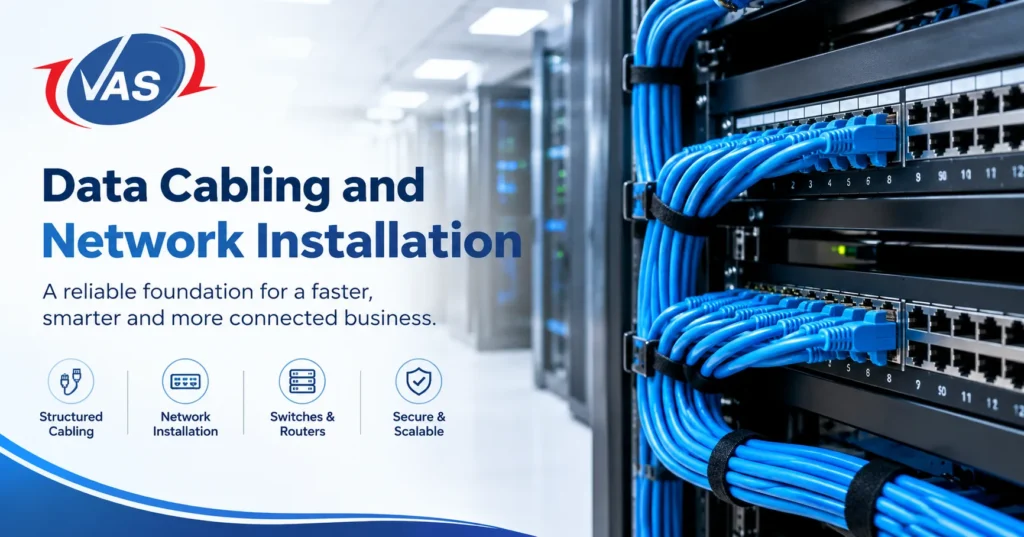
Most people only think about network cabling when something breaks. The Wi-Fi drops during a client call, a CCTV camera keeps going offline, or the IP phones crackle for no obvious reason. Nine times out of ten, the culprit isn’t the internet plan. It’s the wiring and equipment hidden above the ceiling and inside the walls.
This guide explains data cabling and network installation: what it is, which cables to pick, how a proper job runs, which mistakes cost the most, and how to choose a partner.
What Is Data Cabling?
Data cabling is the physical wiring that moves data between your devices. Think of a city’s roads. Your computers, phones, cameras, and servers are the cars, and the cables are the roads. Narrow or damaged roads mean traffic jams, no matter how fancy the cars are.
When all that wiring is planned as one system, with standard parts, clear labels and tidy pathways, it’s called structured cabling. The alternative is the older-office mess: a new cable run every time someone needed a connection, and nobody sure what goes where. Structured cabling replaces that with something planned, documented, and easy to grow.
What Is Network Installation?
Network installation is the wider job. It covers the cabling and everything that connects to and controls it:
- Switches that share the connection between wired devices
- Routers and firewalls that link you to the internet and keep threats out
- Wireless access points that provide Wi-Fi
- Patch panels and racks that keep connections organised
- Configuration and testing so everything works together on day one
Think of it this way: the cabling is the body, and the network equipment is the brain. If either is weak, the whole system suffers.
Why Good Cabling Matters
Many businesses pay for a fast internet plan and good Wi-Fi gear, then connect it all with cheap cabling. That’s like putting a sports car on a dirt track. Good cabling gives you:
- Reliable speed. Quality cable and clean terminations let you actually reach the speed you pay for.
- Fewer outages. Many faults come from loose connections, damaged cable, or messy racks, not your provider.
- Room to grow. Adding a desk, camera, or phone takes minutes when spare capacity was planned.
- Lower long-term cost. Cabling stays for years, so doing it right once beats repeated fixes.
- Faster troubleshooting. Labelled, documented cables turn hours of tracing into minutes.
- Support for modern tools. Cloud apps, video calls, VoIP, IP cameras, and Wi-Fi 6 or 7 all rely on a solid wired backbone.
Which Cable Should You Choose?
Business networks mostly use two families of cable.
Copper (Twisted Pair)
These are the familiar Ethernet cables that connect desks, phones, access points, and cameras. They can also carry power through Power over Ethernet (PoE).
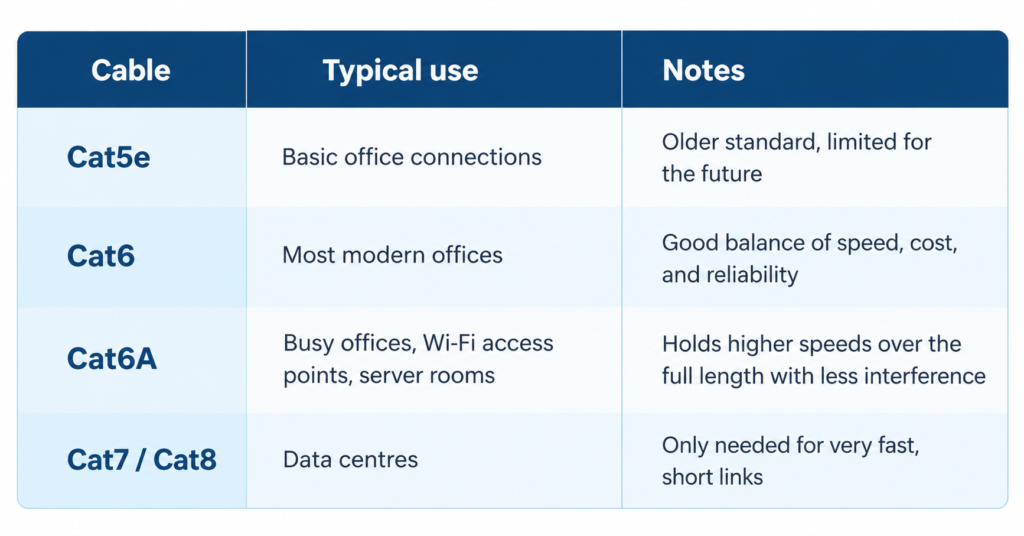
For most new offices, Cat6 or Cat6A is the sensible pick. If you want to be ready for faster Wi-Fi and future upgrades, Cat6A is the safer bet.
Fibre Optic
Fibre sends data as light, which makes it ideal for long distances, links between floors or buildings, and fast connections between switches and servers. It is also immune to electrical interference. Multimode fibre suits shorter runs inside a building, while single-mode suits long distances and very high capacity. A popular setup is fibre for the backbone and copper for the final stretch to each desk.
How a Professional Installation Works
A good project is far more than pulling cable and plugging things in. Here is how a well-run installation usually goes.
- Site survey and requirements. Engineers walk the site, study floor plans, and ask how many people, devices, and applications you have, and where you expect to be in three to five years. This conversation heads off most future problems.
- Design and planning. The design covers cable routes, data point locations, rack layout, switch and Wi-Fi planning, and power. A good design leaves spare capacity so you aren’t redoing work when the team grows.
- Choosing materials. Cables, patch panels, trunking, racks, and connectors are matched to your needs and budget. Quality matters here, because cheap cable is a leading cause of later failures.
- Cable installation. Cables follow the planned routes, away from power lines and other interference, and are handled gently. Bending or pulling too hard can damage a cable that looks fine on the outside.
- Termination and labelling. Each cable is neatly connected to its wall outlet and patch panel, and both ends are clearly labelled. It’s a small detail that saves enormous time later.
- Equipment installation and configuration. Switches, firewalls, routers, and access points are mounted and configured. VLANs, security rules and Wi-Fi coverage are set to match how your business works.
- Testing and certification. Every run is tested for speed, signal quality, and faults, and you receive a report as proof.
- Documentation and handover. You get drawings, cable maps, test results, and a walkthrough. That turns a one-off job into something you can manage comfortably for years.
Common Mistakes to Avoid
These tend to cost businesses the most money and patience:
- Planning only for today. With no spare ports, a network can become a problem within a year or two.
- Buying the cheapest cable. It can fail early, lose speed, or cause random drops.
- Skipping testing. Hidden faults stay hidden until they hurt.
- Ignoring Wi-Fi planning. Randomly placed access points give patchy coverage, even with expensive gear.
- No labels or documentation. Every future change becomes slow, risky, and costly.
- Running power and data cables side by side. This can cause interference and unstable connections.
- Forgetting the comms room. Poor cooling, power, and rack layout shorten equipment life.
- Treating security as an afterthought. Firewall and access settings belong in the install from day one.
How Much Does It Cost?
There is no single price, because no two sites are the same. These factors move the number most:
- The number of data points and the length of cable runs
- Cable type (Cat6, Cat6A or fibre)
- Ceiling and wall types, and how awkward the routes are
- How much equipment is needed, such as switches, firewalls and access points
- Whether it’s a new fit-out or an office people already work in
- Testing, certification and documentation requirements
The most reliable way to get a real figure is a site survey and a written quotation that lists materials and work clearly.
Planning Around an Office Fit-Out
If you’re setting up or renovating an office, bring your IT partner in early. Cabling is easiest and cheapest before ceilings close, and furniture arrives. Planning networking, phones, audio-visual, and CCTV together avoids damaged walls, extra trunking, and last-minute fixes.
How to Choose the Right Partner
Use this checklist when comparing companies:
- Experience with installations similar to yours.
- A full range of services. One partner for cabling, networking, Wi-Fi, security, and support saves you from juggling vendors.
- Trusted equipment brands, a sign of commitment to quality.
- Testing and documentation. Ask for test reports and cable maps.
- Support after installation. Problems don’t stop at handover.
- Local knowledge. In Dubai, requirements like SIRA approvals for CCTV may apply.
- A clear written quotation without confusing extras.
Why Dubai Businesses Trust VAS Technologies
VAS Technologies is a UAE-based IT solutions company with more than 15 years of experience in data networking, IT, voice, and security. It serves clients in over 15 countries and holds a 4.8 out of 5 Google rating from 23 reviews. Its services include:
- Structured Cabling Systems: planned, tested, and documented cabling for offices, shops, and warehouses
- Wireless Networking: Wi-Fi designed around how your space is really used
- Managed IT Services: ongoing support that fixes small issues before they grow
- Cyber Security: firewalls and protection built in from the start
- CCTV and Access Control, plus SIRA Support Services for Dubai approvals
- Servers, Storage and Audio Visual Solutions under one coordinated plan
VAS works with well-known partners including Aruba, Fortinet, Hikvision, Dell, HP, Microsoft and Yealink.
Planning a new office, upgrading a slow network, or untangling messy cabling? Visit vas.ae, call +971-56-284-9700, or chat with an expert on WhatsApp.
Frequently Asked Questions
What is structured cabling in simple words?
A planned, standard, organised cabling system for a whole building, with patch panels, labels, and test records instead of random wires added over time.
Cat6 or Cat6A?
Cat6 suits most offices. Choose Cat6A for heavy data use, faster Wi-Fi access points, or to avoid recabling in a few years. It costs a little more but gives more headroom.
Is fibre better than Ethernet?
Fibre wins for long distances and very fast links. Copper is cheaper, better for individual desks, and can power devices through PoE. Many businesses use both.
How long does cabling last?
Good structured cabling can serve 10 to 15 years or more. Active equipment like switches and access points is usually upgraded sooner.
How long does installation take?
A small office can take a few days. Large offices, warehouses, or multi-floor buildings can take weeks. A site survey gives a realistic timeline.
How many network points per employee?
A common rule is at least two per desk, plus extras for printers, meeting rooms, access points, phones and cameras, and some spares for growth.
Wired or wireless?
You need both. Wired is faster, steadier, and more secure for desks, servers, cameras, and phones. Wi-Fi suits laptops, mobility, and visitors, and every access point still depends on a cable.
Why is my internet slow with a fast plan?
Common causes are old or damaged cables, poor patch cords, outdated switches, weak Wi-Fi coverage, or an underpowered firewall. A network health check pinpoints the cause.
What is PoE?
Power over Ethernet sends power and data through one cable, so phones, access points, and cameras can run without a nearby power socket.
Can I install cabling myself?
For a single small room, yes. For a business, professional installation is strongly recommended, since termination, routing, labelling and testing need training and tools.
How do I know it was done correctly?
Ask for a test and certification report for every run, labelled patch panels, and a cable map.
Do I need a site survey?
Yes. It helps you avoid surprise costs and get an accurate quotation.
How do I get a quotation in Dubai?
Share your floor plan, number of users, and requirements. VAS Technologies can arrange a visit and prepare a quote. Call +971-56-284-9700.
Final Thoughts
A reliable business network doesn’t come from equipment alone. It comes from smart planning, quality cabling, careful installation, and honest testing. Get those basics right, and you’ll have faster work, fewer interruptions, and an easy path to growth.
To get your cabling and network installation planned properly from day one, talk to the experts at VAS Technologies.

Related Post
- Data Cabling and Network Installation: A Practical Guide for Dubai Businesses

- Cloud Backup for Dubai Businesses: What Happens If Your Server Dies?
- Office Fit-Out Technology Guide: Network, Phones, AV and CCTV
- SIRA CCTV Approval in Dubai: Cost, Steps and Timeline for Restaurants, Shops and Warehouses
- Biometric & Access Control System Installation: What Dubai Businesses Actually Need to Know
- How to Pass a SIRA CCTV Inspection in Dubai: Checklist & Common Failures